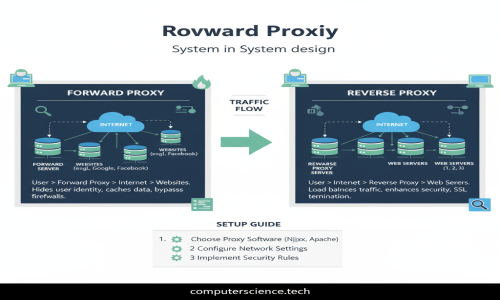
In modern system design, proxies play a crucial role in optimizing, securing, and managing traffic between clients and servers. Whether you’re designing scalable web applications, APIs, or microservices, understanding forward and reverse proxies is essential.
This blog post will cover:
What are Forward and Reverse Proxies?
Their key differences and use cases
How to set up both proxies using a simple example application
Let’s dive right in!
🔍 What is a Proxy Server?
A proxy server acts as an intermediary between a client and another server. It can intercept, route, and modify requests and responses, providing additional functionality such as caching, security, load balancing, or anonymity.
🚀 Forward Proxy: Definition and Use Cases
What is a Forward Proxy?
A forward proxy sits between the client and the internet (or any external server). When a client sends a request, it goes first to the forward proxy, which then forwards the request to the destination server on behalf of the client.
Key Characteristics
Client-facing proxy
Used to control, filter, or anonymize client requests
Typically deployed inside private networks or organizations
Common Use Cases
Access Control: Organizations restrict which websites employees can visit
Caching: Speed up access to frequently requested external content
Anonymity: Hide the client’s IP address when accessing the internet
Bypassing geo-restrictions: Access content blocked in a region
Diagram
Client → Forward Proxy → Internet Server
🔄 Reverse Proxy: Definition and Use Cases
What is a Reverse Proxy?
A reverse proxy sits in front of one or more backend servers and forwards incoming client requests to them. Clients interact only with the reverse proxy, unaware of the backend infrastructure.
Key Characteristics
Server-facing proxy
Used to load balance, cache, secure, and monitor backend servers
Acts as the public entry point for client requests
Common Use Cases
Load balancing: Distribute client requests across multiple backend servers
SSL Termination: Manage HTTPS connections at the proxy layer
Caching: Serve cached responses to reduce backend load
Security: Protect backend servers from direct exposure and attacks
Compression: Compress responses to reduce bandwidth
Diagram
Client → Reverse Proxy → Backend Servers
🆚 Forward Proxy vs Reverse Proxy: Quick Comparison
Feature Forward Proxy Reverse Proxy
Direction Client to Internet Internet to Backend Servers
Main Purpose Control/filter client requests Load balance and secure backend
Location Near clients (internal network) Near backend servers (DMZ)
Transparency Transparent to client’s origin server Transparent to client
Use Cases Content filtering, anonymity SSL offloading, caching, load balancing
🛠️ Setting Up Forward and Reverse Proxies: Sample Application Example
Imagine you have a backend API running on localhost:5000 and you want to:
Use a forward proxy to route requests through a proxy server
Use a reverse proxy to route incoming requests from port 80 to the API on 5000
We will use Nginx as our proxy server for both setups because of its popularity and ease of use.
Step 1: Simple Backend API (Node.js Example)
// app.js
const express = require('express');
const app = express();
app.get('/api/data', (req, res) => {
res.json({ message: 'Hello from backend API!' });
});
app.listen(5000, () => {
console.log('Backend API running on http://localhost:5000');
});
Run this with:
node app.js
Step 2: Setting Up a Reverse Proxy with Nginx
Create an Nginx config file (e.g., /etc/nginx/sites-available/reverse-proxy.conf):
server {
listen 80;
location /api/ {
proxy_pass http://localhost:5000/api/;
proxy_set_header Host $host;
proxy_set_header X-Real-IP $remote_addr;
proxy_set_header X-Forwarded-For $proxy_add_x_forwarded_for;
}
}
Enable the site and restart Nginx:
sudo ln -s /etc/nginx/sites-available/reverse-proxy.conf /etc/nginx/sites-enabled/
sudo nginx -t
sudo systemctl restart nginx
Now, when you visit http://localhost/api/data, Nginx will forward the request to the backend API running on port 5000.
Step 3: Setting Up a Forward Proxy with Nginx
Nginx can act as a forward proxy but requires some extra configuration:
Create /etc/nginx/nginx.conf with a proxy server block:
events {}
http {
server {
listen 8888;
resolver 8.8.8.8;
location / {
proxy_pass $scheme://$http_host$request_uri;
proxy_set_header Host $http_host;
proxy_set_header X-Real-IP $remote_addr;
proxy_set_header X-Forwarded-For $proxy_add_x_forwarded_for;
}
}
}
Restart Nginx:
sudo nginx -t
sudo systemctl restart nginx
Then configure your browser or HTTP client to use localhost:8888 as an HTTP proxy. Now all requests will be forwarded through this Nginx forward proxy.
🧩 Additional Tips
For Forward Proxies, tools like Squid are often used in production due to advanced features.
For Reverse Proxies, alternatives like HAProxy, Traefik, or cloud load balancers can be considered.
Always monitor proxy logs and tune timeout values to avoid bottlenecks.
Use SSL termination on reverse proxies for security and better performance.
🔚 Conclusion
Forward and Reverse Proxies are foundational building blocks in system design, each serving unique purposes in traffic management.
Forward Proxy: Controls client outbound traffic
Reverse Proxy: Manages inbound traffic to backend servers
Understanding these proxies and how to configure them helps backend engineers and system designers build scalable, secure, and efficient systems.