
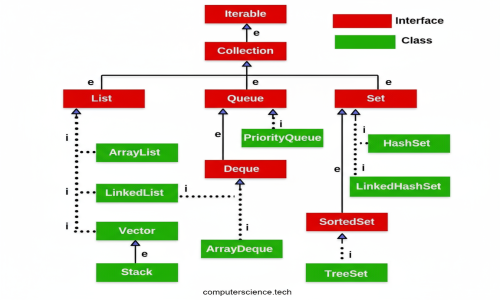
🧺 Different Collection Types in Java
The Java Collections Framework (JCF) provides a set of interfaces and classes to store, manipulate, and process groups of objects efficiently.
These collections are designed to handle various types of data operations such as searching, sorting, insertion, deletion, and synchronization.
🔹 1. List
-
Definition: An ordered collection that allows duplicate elements.
-
Common Implementations:
-
ArrayList→ Fast random access, backed by a dynamic array. -
LinkedList→ Fast insertion/deletion, implemented using a doubly linked list.
-
-
Example:
🔹 2. Set
-
Definition: A collection that does not allow duplicates.
-
Common Implementations:
-
HashSet→ Unordered set, based on hash table. -
LinkedHashSet→ Maintains insertion order. -
TreeSet→ Sorted set, orders elements based on their natural order or a comparator.
-
-
Example:
🔹 3. Queue
-
Definition: A FIFO (First In, First Out) data structure used to hold elements before processing.
-
Common Implementations:
-
PriorityQueue→ Orders elements according to their priority or natural ordering. -
LinkedList→ Can also be used as a queue implementation.
-
-
Example:
🔹 4. BlockingQueue
-
Definition: A thread-safe queue used in concurrent programming, commonly for the Producer-Consumer pattern.
-
Common Implementations:
-
ArrayBlockingQueue -
LinkedBlockingQueue
-
-
Example:
🔹 5. Map
-
Definition: A collection that stores key-value pairs, where each key is unique.
-
Common Implementations:
-
HashMap→ Unordered, fast lookup by key. -
LinkedHashMap→ Maintains insertion order. -
TreeMap→ Sorted map, orders entries by key.
-
-
Example:
🧠 Summary
| Collection Type | Allows Duplicates | Ordered | Sorted | Common Implementations |
|---|---|---|---|---|
| List | ✅ Yes | ✅ Yes | ❌ No | ArrayList, LinkedList |
| Set | ❌ No | ❌ No | ✅ (in TreeSet) | HashSet, LinkedHashSet, TreeSet |
| Queue | ✅ Yes | ✅ Yes (FIFO) | ✅ (in PriorityQueue) | LinkedList, PriorityQueue |
| BlockingQueue | ✅ Yes | ✅ Yes | ❌ No | ArrayBlockingQueue, LinkedBlockingQueue |
| Map | ❌ (Unique Keys) | Depends | ✅ (in TreeMap) | HashMap, LinkedHashMap, TreeMap |
✅ In short:
-
List → Ordered, allows duplicates.
-
Set → No duplicates.
-
Queue / BlockingQueue → FIFO, used for processing tasks.
-
Map → Key-value pairs, unique keys.
Together, these collection types form the backbone of the Java Collections Framework, making data handling efficient, flexible, and powerful.
⚔️ ArrayList vs LinkedList in Java
Both ArrayList and LinkedList are implementations of the List interface in the Java Collections Framework, but they differ significantly in their internal structure, performance, and use cases.
🧩 Internal Implementation
-
ArrayList:
Backed by a dynamic array.
Elements are stored contiguously in memory, similar to a standard array, but the size grows automatically when needed. -
LinkedList:
Implemented as a doubly linked list.
Each element is a node that holds the data and references (prevandnext) to neighboring nodes.
⚙️ Performance Comparison
| Operation | ArrayList | LinkedList |
|---|---|---|
| Access (get by index) | ✅ O(1) — Direct access via index | ❌ O(n) — Must traverse nodes sequentially |
| Insertion (at end) | ✅ O(1) (amortized) | ✅ O(1) (add at tail) |
| Insertion (in middle) | ❌ O(n) — Requires shifting elements | ✅ O(1) if position is known (after traversal) |
| Deletion (by index) | ❌ O(n) — Elements must be shifted | ✅ O(1) if node reference is known |
| Memory Overhead | Low | High (extra space for pointers) |
🧠 Key Differences
-
Data Storage:
-
ArrayList→ Uses a resizable array. -
LinkedList→ Uses nodes connected via pointers.
-
-
Insertion & Deletion:
-
ArrayList→ Slower for insertions/deletions (shifting required). -
LinkedList→ Faster for insertions/deletions once node position is known.
-
-
Random Access:
-
ArrayList→ Very fast (O(1)), direct index-based access. -
LinkedList→ Slow (O(n)), must traverse nodes sequentially.
-
-
Memory Usage:
-
ArrayList→ More memory-efficient. -
LinkedList→ Higher overhead (due to node pointers).
-
💡 When to Use
| Scenario | Recommended Collection |
|---|---|
| Frequent reads / lookups | ✅ ArrayList |
| Frequent insertions / deletions | ✅ LinkedList |
| Memory-sensitive applications | ✅ ArrayList |
| Applications implementing FIFO / Deque logic | ✅ LinkedList |
🧾 Example
🚀 Summary
| Feature | ArrayList | LinkedList |
|---|---|---|
| Internal Structure | Dynamic array | Doubly linked list |
| Random Access | ✅ Fast | ❌ Slow |
| Insertion / Deletion | ❌ Slower (shifting) | ✅ Faster (pointer update) |
| Memory Usage | ✅ Lower | ❌ Higher |
| Best Suited For | Read-heavy operations | Write-heavy operations |
✅ In short:
-
Use
ArrayListfor read-intensive applications. -
Use
LinkedListfor frequent insertions or deletions.
Both are powerful, but the right choice depends on your use case and performance needs.
