If you’re just getting started with Python, one question will pop up early in your journey:
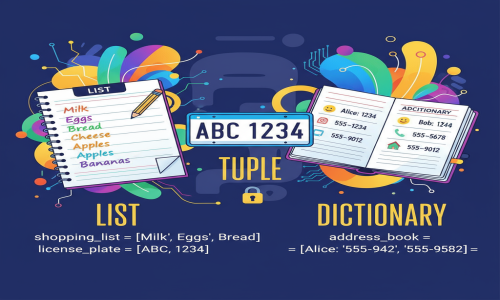
❓ What's the difference between lists, tuples, and dictionaries in Python?
They’re all used to store collections of data, but they behave quite differently.
In this blog, we'll break it down in a simple and visual way so you can master these foundational data structures.
📦 1. What is a List?
✅ Definition:
A list is a mutable, ordered collection of items. You can change, add, or remove elements after the list is created.
📘 Syntax:
🔧 Properties:
-
Ordered (items have a specific position)
-
Mutable (can be changed)
-
Allows duplicate values
-
Can hold mixed data types
🧪 Example:
📤 Output:
🔐 2. What is a Tuple?
✅ Definition:
A tuple is an immutable, ordered collection of items. Once created, its elements cannot be modified.
📘 Syntax:
🔧 Properties:
-
Ordered
-
Immutable (cannot be changed)
-
Allows duplicates
-
Can hold mixed data types
-
Uses less memory than lists
🧪 Example:
📤 Output:
⚠️ Trying to change coordinates[0] = 100 will raise an error.
🗂️ 3. What is a Dictionary?
✅ Definition:
A dictionary is an unordered, mutable collection of key-value pairs. It is ideal for storing data that’s connected in a mapping.
📘 Syntax:
🔧 Properties:
-
Unordered (Python 3.6 and earlier), but preserves insertion order from Python 3.7+
-
Mutable
-
No duplicate keys
-
Keys must be unique and immutable
-
Fast lookups using keys
🧪 Example:
📤 Output:
🔄 Key Differences at a Glance
| Feature | List | Tuple | Dictionary |
|---|---|---|---|
| ✅ Ordered? | Yes | Yes | Yes (Python 3.7+) |
| 🔁 Mutable? | Yes | No | Yes |
| 🔑 Indexed by | Integer Index | Integer Index | Keys (can be strings, numbers) |
| 📚 Data Format | [1, 2, 3] | (1, 2, 3) | {'a': 1, 'b': 2} |
| ♻️ Duplicates | Allowed | Allowed | Keys must be unique |
| 📦 Use Case | Collections of items | Fixed values | Mapping values to keys |
💡 When to Use What?
| Use Case | Data Structure |
|---|---|
| You need to change or grow the collection | List |
| You want fixed, read-only data (e.g. coordinates, days of the week) | Tuple |
| You want to associate keys with values (e.g. name: age) | Dictionary |
🧠 Pro Tip: Nesting is Possible!
You can nest lists, tuples, and dictionaries inside one another.
🛠️ Small Real-World Example
Let’s imagine a scenario: you're storing student data.
This example shows all three structures used in a meaningful way.
✅ Summary
Python provides different data structures for different needs:
-
Lists → Flexible, changeable, good for collections.
-
Tuples → Safe, fixed data, less memory.
-
Dictionaries → Key-value pairs, like a mini-database.
Mastering these is the first step toward writing clean, efficient, and Pythonic code.
🔥 Tip: Want to become a pro Pythonista? Practice manipulating lists, tuples, and dictionaries in small projects — like a contact book, to-do app, or CSV data parser.
📚 Suggested Reading