Understand Promises, async/await, and the Event Loop Like a Pro
JavaScript is single-threaded — it can only do one thing at a time. So, how does it handle tasks like fetching data from a server, reading a file, or responding to user input — without freezing the entire app?
The answer lies in asynchronous programming.
In this blog, we’ll explore the core concepts that power asynchronous behavior in JavaScript:
-
✅ What is asynchronous programming?
-
✅ How do Promises work?
-
✅ Why and how to use
async/await? -
✅ What is the JavaScript Event Loop?
Let’s dive in.
📌 What is Asynchronous Programming?
Asynchronous means non-blocking — your code doesn’t have to wait for a long task (like a network request) to finish before moving on to the next task.
This is especially important in web development, where a slow operation (like an API call) could freeze the browser if not handled asynchronously.
🧩 The Problem with Callbacks
Before Promises, JavaScript used callbacks for async operations. But nested callbacks led to the infamous:
Callback Hell 😵
It becomes hard to read, test, and maintain.
✅ Promises: Cleaner Asynchronous Code
A Promise represents a value that may be available now, in the future, or never.
📖 Basic Syntax:
🔄 Chaining Promises
This solves callback hell — but it can still get tricky in large flows.
✨ async/await: Syntactic Sugar Over Promises
Introduced in ES2017 (ES8), async/await makes asynchronous code look synchronous, while still being non-blocking.
📖 Example:
🔍 Notes:
-
Any function marked with
asyncreturns a Promise. -
Inside it,
awaitpauses execution until the Promise resolves. -
It makes your code cleaner, easier to read, and debug-friendly.
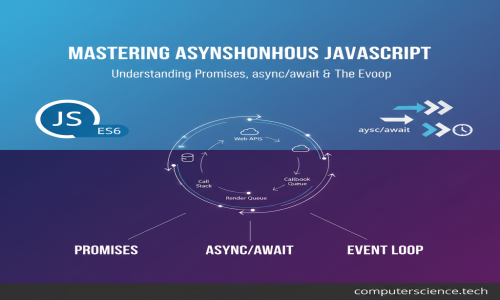
🔁 The JavaScript Event Loop
Understanding the event loop is key to mastering async behavior.
💡 How JavaScript Handles Async Tasks:
-
Call Stack: Where function calls are processed one by one.
-
Web APIs: Browser APIs like
setTimeout,fetch, etc. -
Callback Queue: Stores tasks that are ready to be executed.
-
Event Loop: Monitors the call stack & callback queue.
-
If the call stack is empty, it pushes the first callback into the stack.
-
📊 Visualization:
Even though setTimeout has 0ms delay, it runs after synchronous code finishes. Why? Because of the event loop.
🧪 Real-World Use Case
Use Case: Fetch data from an API and display it
This kind of code is common in:
-
Frontend apps (React, Vue, Angular)
-
Backend services (Node.js APIs)
-
Mobile apps (React Native)
-
Serverless functions (AWS Lambda)
⚠️ Common Mistakes to Avoid
🚫 Forgetting to use await
🚫 Using await outside an async function
🚫 Not handling errors with try/catch or .catch()
🚫 Mixing too much then() with await (choose one style)
🚫 Blocking the event loop with heavy sync code (e.g., infinite loops)
✅ Summary
| Concept | Description |
|---|---|
| Callback | Old async method, can get messy |
| Promise | Cleaner, avoids nested callbacks |
| async/await | Syntactic sugar over promises |
| Event Loop | Controls order of async execution |
Mastering these four concepts will dramatically improve your JavaScript skills and help you build responsive, non-blocking, and scalable applications.